Blind Sight: How a guy with low vision navigates stairs

Clarifying my vision

I qualify as being legally blind. According to the Massachusetts Association for the Blind and Visually Impaired, this means that I have “central visual acuity (vision that allows a person to see straight ahead of them) of 20/200 or less in his or her better eye with correction.”

But I can still see lots of things — colors, shapes, faces and TVs (if I’m close enough). Sometimes when I tell people I have low vision, they respond that they would have never guessed this had I not said something. Others say that it’s easy to ascertain that I have vision problems by just being around me for a few moments.

When people ask me about how well I can see, I find it challenging to give them a simple answer. Definitions like the one above are inexact, and there’s no static point of reference to compare my unique eyesight to. On top of this, my visual acuity changes depending on lighting, weather, mental state, and numerous other factors. Add to that my lifelong propensity to minimize and even deny my visual impairment, and I have this massive, emotionally triggering, socially charged part of my life that’s really difficult to explain and that I would usually prefer not to talk about.

In recent years, I have worked hard to combat this stigma, embrace my blindness, and integrate it into my identity. This is an ongoing journey, and if you’re interested, I invite you to come along with me for part of it in this series of articles I’m calling Blind Sight. In these posts, I will try to unpack and articulate different aspects of my vision disability and how it shapes the way I interact with the world around me. I’m hoping this exercise will help clarify my thinking as well as build understanding and empathy with members of the blind and visually impaired community.

Step by step: climbing stairs

My three-year-old nephew and I both have congenital nystagmus, which does a number on our depth perception. A few weeks ago, my sister and I were talking about how he navigates climbing up and down stairs. Since he is still too young to articulate his perspective on this, my sister asked me how I perceive and approach staircases with low depth perception in hopes of better understanding her son’s experience. This led to an interesting conversation that is helping me think through my own challenges and “missteps” with stairs.

First off, it might be useful to know that climbing up stairs is much easier than going down a staircase. Even when I cannot tell exactly how deep the next raised horizontal flat space is, I can usually gauge its height and determine the minimum distance to lift my feet to climb to it. This is especially true when the vertical distance between steps remains constant. Modern building codes provide regulations for the length of stair risers and depths, as well as stipulations to ensure consistency in vertical distance between steps. For instance, stairs in Massachusetts state buildings must be at least 9 inches deep and no more than 8.25 inches higher than the previous step. This gives me a sense of confidence that when I start climbing a staircase, I can safely assume that the space between each step will be the same. I can then shift my focus to counting the number of steps and watching for the landing at the top of the flight.

Stairs in older buildings or carved into natural structures may not adhere to code and have different heights. These typically require additional concentration for me to navigate.

Walking down stairs can be a different story (ugh). When looking down a flight of stairs with limited depth perception, the vertical distance between steps can be indistinguishable. Unless I have walked down a staircase enough times to memorize the number of steps and the space between them, I rely on several mechanisms to augment my vision and ensure a safe descent.

  • Handrails: Feeling for and using a handrail can provide stability and me maintain balance while giving me a good idea of the slope of the staircase.
  • Color Contrast: Visual contrast between the stairs and the surrounding area can make them more noticeable. For example, using contrasting colors on the edges of steps can help me distinguish between them.
  • Counting Steps: Memorizing the number of steps and the layout of a staircase can help me navigate without relying solely on vision.
  • Listening for Auditory Cues: Paying attention to sounds such as creaks, echoes, or other changes in the environment can provide cues about the presence and proximity of bottom of a staircase.
  • Physical Texture: Sometimes the edge of each step, or the top and bottom of a staircase will feel different from their adjacent surfaces. This can be a helpful indicator in judging the presence of a drop to the next step or the start and end of a flight.
  • Other Visual Clues: Sometimes observing the cut of the stairs against the wall or material along which they run can help me gauge the distance between them. Shadows and other lighting effects can also assist with discernment, but these factors are less reliable as the presence and brightness of light sources can change throughout the day and night.
  • Following Someone Down the Stairs: When I’m going down an unfamiliar staircase, one of the most effective sources of help is watching the feet of someone descending the steps in front of me. The way a person bends their knees and the rate at which the go from step to step provides wonderful information about the characteristics of the staircase. If I can match the person’s speed and gait, I can quickly get a feel for the stairs and descend them with confidence. Often, the individual in front of me doesn’t even know how much they have helped me, and I don’t often get the chance to express my appreciation due to being in a rush or the awkwardness of talking to a stranger. So bear in mind, if you ever notice someone closely trailing you down a staircase, they might literally be following in your footsteps (and not stalking you).

A set of carpeted stairs with wooden framing along the top and bottom steps; it is difficult to distinguish the edges of the middle steps

As an illustration, consider the short set of stairs in the image preceding this paragraph. There are only four steps, but it’s not easy to differentiate between the middle ones because of the uniform color of the carpeting. The wooden framing on the top and bottom steps provides visual and tactile indicators of the top and bottom of the stairs. This paneling also gives a rough idea of the vertical drop between the first couple steps if I look at the sides of each stair (which I may or may not think to do). However, the side paneling stops at the bottom step, which extends left and right beyond what is visible, and so the height of the last step down is indeterminate. I need to process as much of this information as possible while approaching these steps, which may be challenging depending on what I’m focused on at the time. It would be nice if the middle steps were also lined with the wooden paneling, making their edges more noticeable.

I find “slow and steady” to be a good motto when I encounter a new downward staircase. If there is no visible edging on the top step, I might pause and use my foot to feel for its lip while scanning for other helps and layout clues. Once I find a railing, edge marking, or allow someone close behind to pass and descend the steps first, I feel much more optimistic about making my way down to the next level.

Navigating stairs with minimal depth perception can be complicated, but employing creative and sometimes non-visual coping strategies and context clues can be a big help.

Did you find this explanation interesting? Do you have a question about how people with vision disabilities navigate and interact with the world?

More Blind Sight articles

Close up of feet walking uphill on a wooded trail Blind Sight: How a legally blind guy goes hiking People who are blind and visually impaired can find freedom and fulfillment in the great outdoors. Here are some strategies I use to make sure my hikes are as enjoyable as possible.

Closeup view from the bottom end of a piano keyboard in sepia tone Blind Sight: How to practice piano when you can’t see sheet music How do blind people learn to play piano? Here are some reflections on a few of the methods I have used to thrive as a pianist with low vision.

The hammers beneath an upright piano cover above the instrument's keys Blind Sight: More on how a blind guy learns to play piano Additional thoughts on how blind people can become proficient at playing the piano.

Cars zoom through a busy intersection with a brightly painted crosswalk and overhanging set of stoplights Blind Sight: Why did the blind guy cross the road? I am legally blind, and I live near a busy intersection near Boston. I don't typically use a cane to get around familiar places, but this intersection is still challenging when drivers don't observe the walk signals. I wondered if anything might change if I used my cane. Here's what happened.

White silhouettes of a man and a woman dance beneath the Disability Pride flag. The man is holding a red-tipped cane in one of his hands. Blind Sight: The Pride Behind the Pride, a Thank-You to Those Who Dance with Us July is Disability Pride Month—a time to honor the experiences, rights, and dignity of people with disabilities. This month, many of us assert our identities, share our stories, and push for change in a world not yet built with us in mind. But today, I want to use this moment to shine a light in a different direction.
Share This

Automated accessibility testing is great, but it’s not enough. Here’s why.

Depending on who you ask, automated testing can supposedly detect up to 57% of web accessibility issues. With advances in AI, the scope of automated accessibility testing coverage is increasing and will continue to do so. While this is encouraging, it is very unlikely that automated tests will ever be able to find every accessibility problem.

Websites are built by humans, for humans, and each has its own specific design and purpose unique to its creators. The subtleties and nuances inherent in each website are what make manual accessibility testing necessary. While we can outlined specific scenarios that cannot be automatically tested for accessibility and even enumerate all WCAG criteria for which automated tested falls short, I think the limitations of automated accessibility testing can be summed up into three basic reasons.

Context

Computers are notoriously bad at answering the question “why?” We have been able to teach them how to figure out the what, where, when, who, and how of data, but when it comes to determining meaning based on the perspective, purpose, relevance, and bias built into all knowledge, automation falls down. Since the question of “why” is central to creating good link text, audio descriptions, and text alternatives for non-text content, a human touch is required to ensure this content is accurate, focused, and germane.


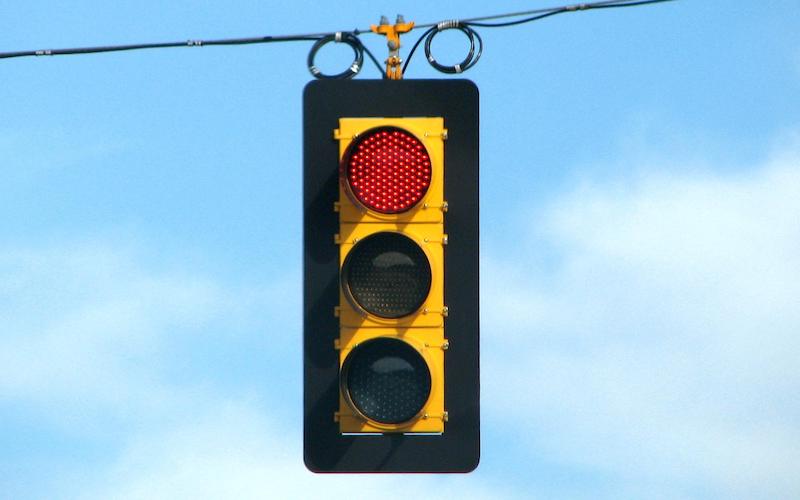
A stoplight with the red light lit hangs from a wire against the backdrop of a blue sky

As an example, take this image of the Big Sky stoplight installed in a small mountain community in Montana several years ago. In the news story describing this project, it might make sense for the alternative text for this image to describe a large stoplight with its red light lit hanging from a wire against a blue sky backdrop. But what if this image was featured in an article about how stoplights are not bright enough on sunny days for people with visual impairments to tell whether or not it’s safe to cross the street? What if the image served as a pictorial warning in a web page about consuming excessive amounts of alcohol or narcotics? Appropriate alt text is very different for each of these situations and based largely upon the context in which the image resides. Automated testing can discern whether or not alt text for the image is present, but it cannot determine the quality or relevance of this text because it doesn’t understand context.

Complex components

To make websites accessible, developers are encouraged to use native semantic HTML whenever possible. Yet the modern web is full of date pickers, sliders, carousels, and other complex widgets that require more than basic HTML. Even when these are built with good markup, testing their accessibility is nontrivial.

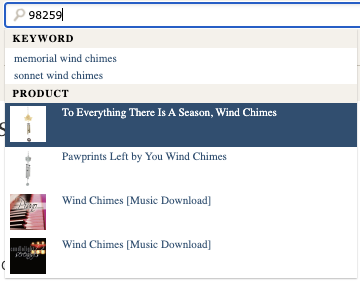
An example of a predictive search field with results based on search keyword and matching products

Take for instance the nearly ubiquitous autocomplete/predictive search form, which makes suggestions as you type your search query based on keywords, related searches, matching products, and many other criteria. Besides ensuring the combobox and other patterns used in this widget have proper keyboard navigation and working ARIA attributes, the data returned by the search component needs to be validated. Are the correct kinds of results (i.e. promotional links, trending terms, recommendations, etc.) being returned? Is the expected number of each type present? Are the results consistently and reliably announced to assistive technologies as updates occur?

Every website is different, and that means every predictive search implementation will be unique. If trying to automate accessibility testing for a “vanilla” autocomplete search field isn’t daunting enough, the distinct logic that needs to be exercised for any given website’s predictive search feature makes comprehensive automated testing infeasible apart from custom tests programmed by the website’s developers. Automated accessibility testing for a component like this does not come out of the box.

Completion of complicated tasks

A simple flow chart wit a start state, decision point leading to several process boxes followed by a shared action and end state

Almost every website exists to encourage and enable its users to complete one or more tasks. Whether it’s placing an order, making a donation, or submitting an application, most of these tasks span multiple web pages. The process of ensuring a user’s journey through a multi-step task works properly is called integration testing, and automating it often requires lots of custom development unique to the task and website.

When doing integration testing, you don’t just want to test the “happy path” in which everything goes smoothly and according to plan. You also want integration tests for error conditions due to invalid user input, missing resources, system latency, and other conditions to ensure the website can handle and recover from these unhappier states. Testing for accessibility should be layered into each integration test.

Consider the unfortunate case of trying to purchase a ticket to a concert that sells out while you are placing an order for it. This is not an outcome anyone wants, but it’s an important scenario for a busy ticketing website to test. Accessibility considerations for this scenario include verifying the form fields to enter address, shipping, and payment information can be programmatically identified, ensuring there’s an accessible error message focused and announced to assistive technologies about the tickets no longer being available, and more likely than not, completing a CAPTCHA puzzle. While custom automated tests for these conditions can and should be created as part of this scenario’s integration test, you won’t find any automated accessibility testing tool that can handle this case on its own.

Conclusion

Manual testing is and will always be part of good accessibility assessments and evaluations. While automated testing has its space, and that space is getting bigger, it cannot fully replace a real live person testing a website for accessibility. The question of “why” is one that only humans can answer effectively.

Pedal Point Solutions offers a free manual assessment of some of the most common accessibility issues that cannot be detected by automated tools. This is a quick and easy way to get started with accessibility testing for your website. There’s no obligation, and the assessment comes with a written report of any issues discovered. Set up your free assessment today.

Share This

New year, new blog

Happy 2024, everyone! As part of building Pedal Point Solutions this year, I am going to try writing a weekly blog post in this space. There are several hopes for this endeavor.

  • To foster conversation and engagement about matters related to web accessibility.
  • To distill my thoughts and ideas about accessible design, development, testing, advocacy, and doing life as an individual with a disability.
  • To develop a community of people excited about and committed to web accessibility.

As I consider the beginning of a new year, I find myself thinking about things that drive us to do web accessibility. There are lots of good reasons to make the web accessible, but as I look ahead, I think one of the most basic motivators is this. We do digital accessibility for ourselves and for those we love.

Over the holiday, I watched as one of my kids helped my dad troubleshoot an issue with his online bank account. My father’s vision has been dwindling in recent years, and it was apparent that he was struggling with some of the visual elements on his bank’s website as he fiddled with his laptop keyboard. I asked him if he would be interested in learning to use a screen reader, and he responded that perhaps that might be a good idea.

Then I thought about my own limited eyesight and how I have perceived it becoming less acute in recent months. It made me realize that I will need an accessible web more and more in the coming years. Digital accessibility issues which are now inconveniences to me will soon become barriers if they are not addressed in the near future.

And this is really the truth for all of us. Even if we don’t think we need an accessible web right now, we will need it soon. Obviously, there are billions of people who need the web to be accessible today, and that should be reason enough to do the work, but my point here is that we all have a deeply personal incentive for an accessible web.

So Happy New Year to all and let’s get to work.

Question: What kind of material would you like to see covered on this blog?

Share This