

Depending on who you ask, automated testing can supposedly detect up to 57% of web accessibility issues. With advances in AI, the scope of automated accessibility testing coverage is increasing and will continue to do so. While this is encouraging, it is very unlikely that automated tests will ever be able to find every accessibility problem.
Websites are built by humans, for humans, and each has its own specific design and purpose unique to its creators. The subtleties and nuances inherent in each website are what make manual accessibility testing necessary. While we can outlined specific scenarios that cannot be automatically tested for accessibility and even enumerate all WCAG criteria for which automated tested falls short, I think the limitations of automated accessibility testing can be summed up into three basic reasons.
Context
Computers are notoriously bad at answering the question “why?” We have been able to teach them how to figure out the what, where, when, who, and how of data, but when it comes to determining meaning based on the perspective, purpose, relevance, and bias built into all knowledge, automation falls down. Since the question of “why” is central to creating good link text, audio descriptions, and text alternatives for non-text content, a human touch is required to ensure this content is accurate, focused, and germane.

As an example, take this image of the Big Sky stoplight installed in a small mountain community in Montana several years ago. In the news story describing this project, it might make sense for the alternative text for this image to describe a large stoplight with its red light lit hanging from a wire against a blue sky backdrop. But what if this image was featured in an article about how stoplights are not bright enough on sunny days for people with visual impairments to tell whether or not it’s safe to cross the street? What if the image served as a pictorial warning in a web page about consuming excessive amounts of alcohol or narcotics? Appropriate alt text is very different for each of these situations and based largely upon the context in which the image resides. Automated testing can discern whether or not alt text for the image is present, but it cannot determine the quality or relevance of this text because it doesn’t understand context.
Complex components
To make websites accessible, developers are encouraged to use native semantic HTML whenever possible. Yet the modern web is full of date pickers, sliders, carousels, and other complex widgets that require more than basic HTML. Even when these are built with good markup, testing their accessibility is nontrivial.
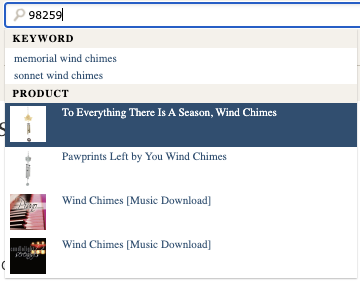
Take for instance the nearly ubiquitous autocomplete/predictive search form, which makes suggestions as you type your search query based on keywords, related searches, matching products, and many other criteria. Besides ensuring the combobox and other patterns used in this widget have proper keyboard navigation and working ARIA attributes, the data returned by the search component needs to be validated. Are the correct kinds of results (i.e. promotional links, trending terms, recommendations, etc.) being returned? Is the expected number of each type present? Are the results consistently and reliably announced to assistive technologies as updates occur?
Every website is different, and that means every predictive search implementation will be unique. If trying to automate accessibility testing for a “vanilla” autocomplete search field isn’t daunting enough, the distinct logic that needs to be exercised for any given website’s predictive search feature makes comprehensive automated testing infeasible apart from custom tests programmed by the website’s developers. Automated accessibility testing for a component like this does not come out of the box.
Completion of complicated tasks

Almost every website exists to encourage and enable its users to complete one or more tasks. Whether it’s placing an order, making a donation, or submitting an application, most of these tasks span multiple web pages. The process of ensuring a user’s journey through a multi-step task works properly is called integration testing, and automating it often requires lots of custom development unique to the task and website.
When doing integration testing, you don’t just want to test the “happy path” in which everything goes smoothly and according to plan. You also want integration tests for error conditions due to invalid user input, missing resources, system latency, and other conditions to ensure the website can handle and recover from these unhappier states. Testing for accessibility should be layered into each integration test.
Consider the unfortunate case of trying to purchase a ticket to a concert that sells out while you are placing an order for it. This is not an outcome anyone wants, but it’s an important scenario for a busy ticketing website to test. Accessibility considerations for this scenario include verifying the form fields to enter address, shipping, and payment information can be programmatically identified, ensuring there’s an accessible error message focused and announced to assistive technologies about the tickets no longer being available, and more likely than not, completing a CAPTCHA puzzle. While custom automated tests for these conditions can and should be created as part of this scenario’s integration test, you won’t find any automated accessibility testing tool that can handle this case on its own.
Conclusion
Manual testing is and will always be part of good accessibility assessments and evaluations. While automated testing has its space, and that space is getting bigger, it cannot fully replace a real live person testing a website for accessibility. The question of “why” is one that only humans can answer effectively.
Pedal Point Solutions offers a free manual assessment of some of the most common accessibility issues that cannot be detected by automated tools. This is a quick and easy way to get started with accessibility testing for your website. There’s no obligation, and the assessment comes with a written report of any issues discovered. Set up your free assessment today.